 If you own a website or manage domains for clients, chances are you’ll eventually receive emails claiming there is a problem with your DNS settings. Recently I received one titled:
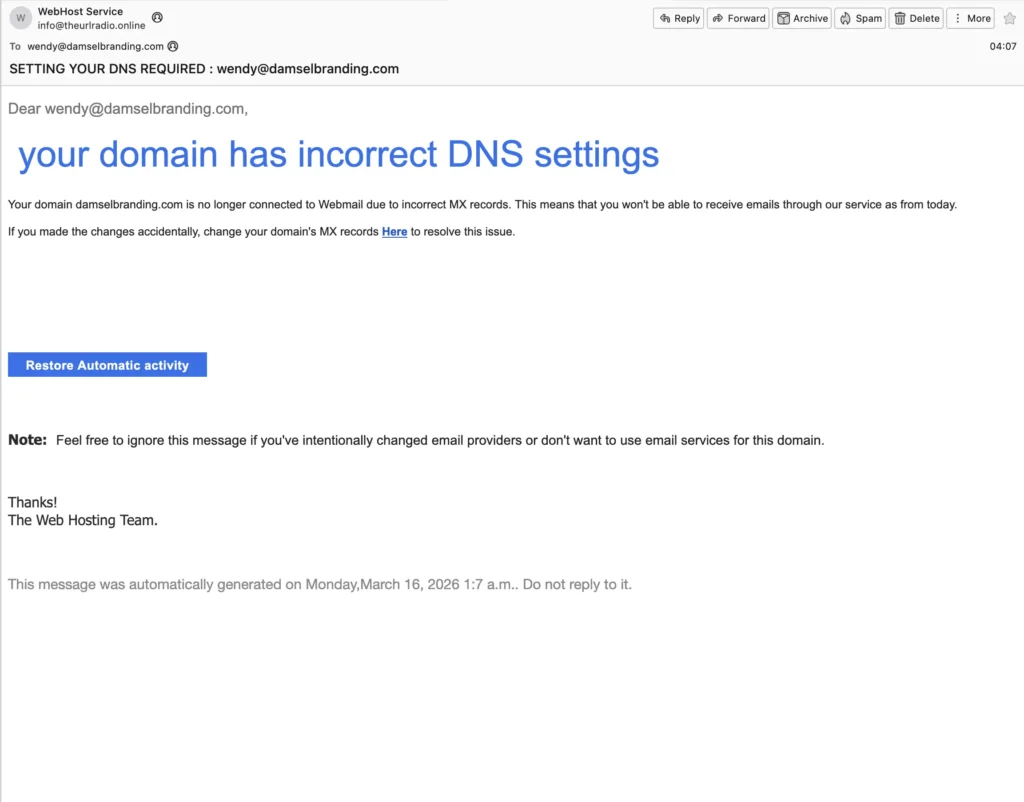
“SETTING YOUR DNS REQUIRED: wendy@damselbranding.com”
The message looked urgent and claimed that my domain had incorrect DNS settings and that email services would stop working immediately unless I clicked a button to “Restore Automatic Activity.”
Spoiler alert: It’s a scam.
These emails are designed to scare website owners into clicking links that lead to phishing sites or fraudulent services.
Let’s break down how to recognize this type of scam and why it should be ignored.
What the Email Claims
The email states:
“Your domain has incorrect DNS settings… your domain is no longer connected to Webmail due to incorrect MX records.”
Then it pushes you to click a link or button to “fix” the problem.
To someone who isn’t familiar with domain settings, that sounds serious. DNS and MX records control where email for a domain is delivered, so the message is intentionally written to trigger panic.
But there are several red flags.
Red Flag #1: The Sender Is Not Your Provider
The email came from:
info@theurlradio.online
That domain has absolutely nothing to do with my domain registrar, hosting company, or email provider.
If there were actually a DNS issue, the notification would come from the company that manages your DNS or email hosting.
Red Flag #2: Generic Language
Scam emails rarely include specific information about your account.
Notice what the email doesn’t include:
• No hosting provider name
• No account ID
• No reference to the actual DNS service being used
• No details about what MX records should be
Legitimate providers include specific technical details and links to their own support documentation.
Red Flag #3: Urgency and Fear
The email says your email service will stop working “as from today.”
Creating urgency is a classic phishing tactic. The goal is to make you click before you stop to verify the message.
Real hosting providers almost always provide time to resolve issues and direct you to your account dashboard rather than a mystery button in an email.
Red Flag #4: Suspicious Buttons and Links
The email includes a large blue button labeled:
“Restore Automatic Activity”
That’s not a standard DNS action. It’s vague on purpose.
Clicking buttons like this can lead to:
• Fake login pages
• Payment scams
• Malware downloads
• Attempts to steal your domain credentials
What You Should Do Instead
If you ever receive a DNS warning email:
- Do NOT click any links in the email.
- Log in directly to your domain registrar or hosting account.
- Check your DNS settings from the official dashboard.
- Contact your provider directly if something seems wrong.
If everything looks normal, simply delete the email.
Why These Scams Are Increasing
Website owners are frequent targets because domains are valuable. If scammers gain access to your DNS or registrar account, they could:
• Redirect your website
• Intercept your email
• Transfer your domain
• Hold your domain hostage for payment
That’s why awareness is so important.
Final Advice for Website Owners
If an email about your domain feels suspicious, it probably is.
Always verify issues inside your hosting account, never through links in an unsolicited email.
A legitimate provider will never require you to fix DNS through a random email button.
When in doubt, ignore the message and verify independently.
Staying cautious helps protect your website, your business, and your clients.